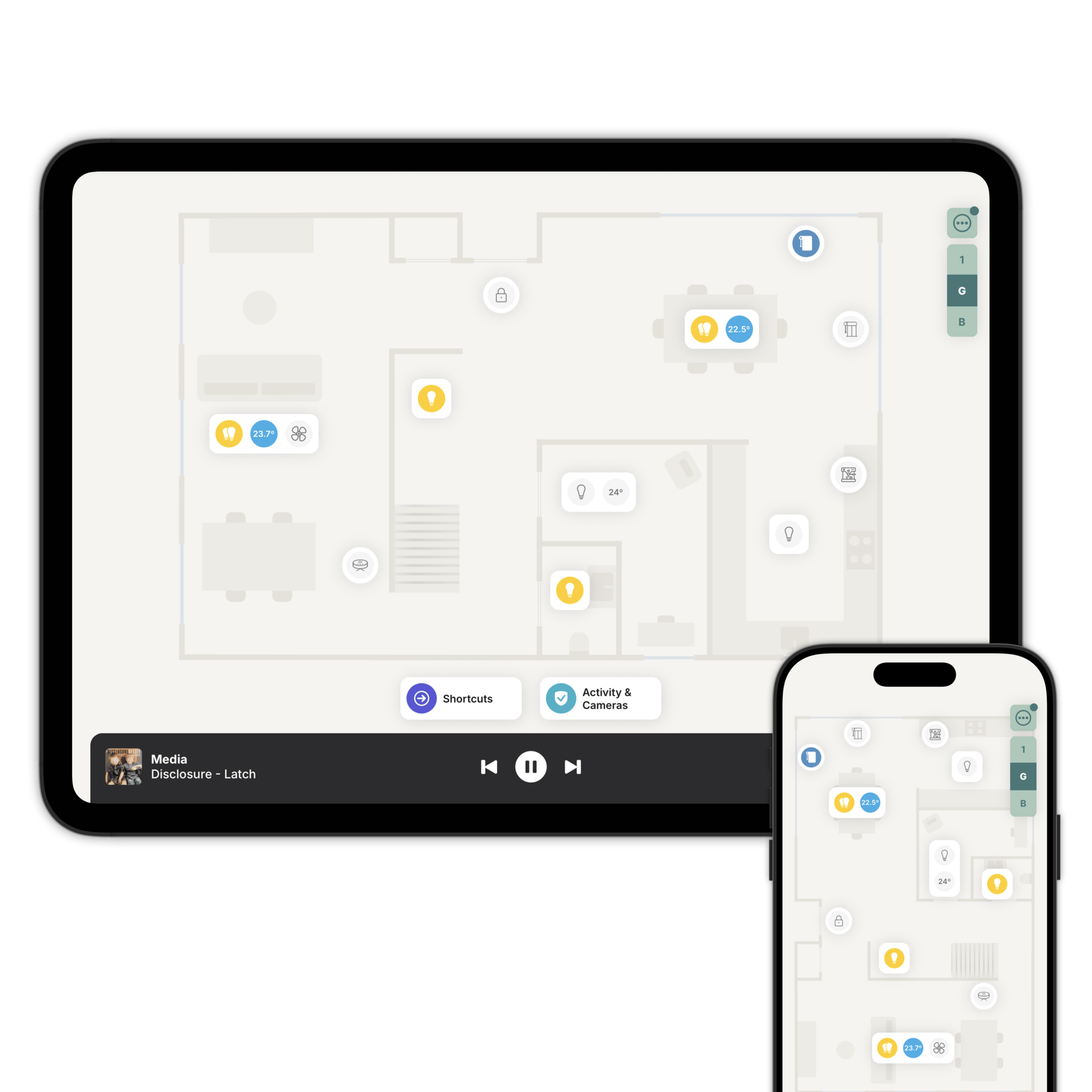
Zendo turns your home into a visual, interactive floorplan. You set up rooms, place accessories where they physically are, and control everything by tapping on the floorplan.
Zendo connects directly to your Home Assistant and brings a visual way to experience your smart home, designed to look and feel great on any screen, for everyone in the household. No code required, no templates to debug.
A floorplan gives you a sense of place: you recognise the rooms, you see where things are, and you already know what to do. It feels like home, because it looks like home.
Zendo gives everyone in the household a visual, intuitive way to control every device: from lights and thermostats to locks, cameras, and blinds. If it's connected to your Home Assistant, it works in Zendo.
Getting started is simple. If you have an iPhone Pro/iPad Pro, scan your rooms and your floorplan is ready in seconds. On any other device, upload your floorplan and adjust it to your liking.
Zendo automatically places your accessories on the floorplan; and you can rearrange, add, or personalise anytime. No re-pairing needed.
iPhone, iPad, Android phones & tablets. Whether you're at home on the sofa, checking your cameras from the office, or adjusting the thermostat from bed, Zendo gives you instant access to your Home Assistant.
Each person gets a personalised view of the floorplan through Family Sharing. You choose exactly which accessories each person can see and control. A guest staying for the weekend sees the guest room and the living room. You see everything. This keeps the experience simple for each person and gives you full control over who can do what.
Zendo lets you place shortcuts directly on your floorplan: one-tap routines for the things you do every day. Tap "Good Night" and your lights dim, doors lock, blinds close, and the thermostat adjusts for sleep. Tap "I'm Home" and the house warms up, your favourite playlist starts, and the security system disarms. It works with your existing automations and scenes.
Zendo also includes an AI assistant that helps you create shortcuts. Describe what you want in plain language: "dim the lights and play my relax playlist", and the assistant builds it for you. It can also suggest ideas based on your setup.
Your home can react automatically when people arrive or leave. Set up location-based automations per person: when you leave for work, the lights turn off and the thermostat switches to eco mode. When someone gets home, the hallway lights come on and the front door unlocks.
These automations are tied to people, not devices. If someone changes phones, the automations carry over automatically, no reconfiguration needed. And if your phone has a weak signal when you arrive, Zendo sends a notification and retries the automation when you open the app, so automations don't silently fail.
Zendo connects directly to your Home Assistant. Commands, device states and camera streams go there directly, not through Zendo's servers. All connections are encrypted and local-only control is fully supported, so your home keeps working even if the internet goes down.
Your app configuration is protected with end-to-end encryption. The encryption key is stored on your Home Assistant, Zendo cannot access it. The key never leaves your devices. You can use Zendo without creating a Zendo account. No personal data is collected, and your location data stays on your device.
Keeps working when the internet doesn't.
Turn on automatic selection and Zendo uses a local connection on the Wi-Fi networks you trust, and a remote one everywhere else. Your floorplan keeps working while your home internet is down.
We follow the connection security practices the Home Assistant Companion app sets, rather than inventing our own.
How Home Assistant connects to Zendo
However you've already set it all up. Zendo doesn't change any of it.
That's the only connection Zendo makes. Everything works through it.
Add each one to the floorplan, in the room it's actually in.
Questions people ask first
No, and it isn't trying to. Home Assistant keeps running underneath and your dashboards stay exactly where they are. Zendo is another visualisation of your accessories.
No. Zendo reads what your system already exposes. Linking each Zendo room to the matching area is worth doing, because that's what powers automatic light grouping and climate monitoring.
Download the app now and create your floorplan.