Home AssistantHomey2 November 2026 · v26.11.2
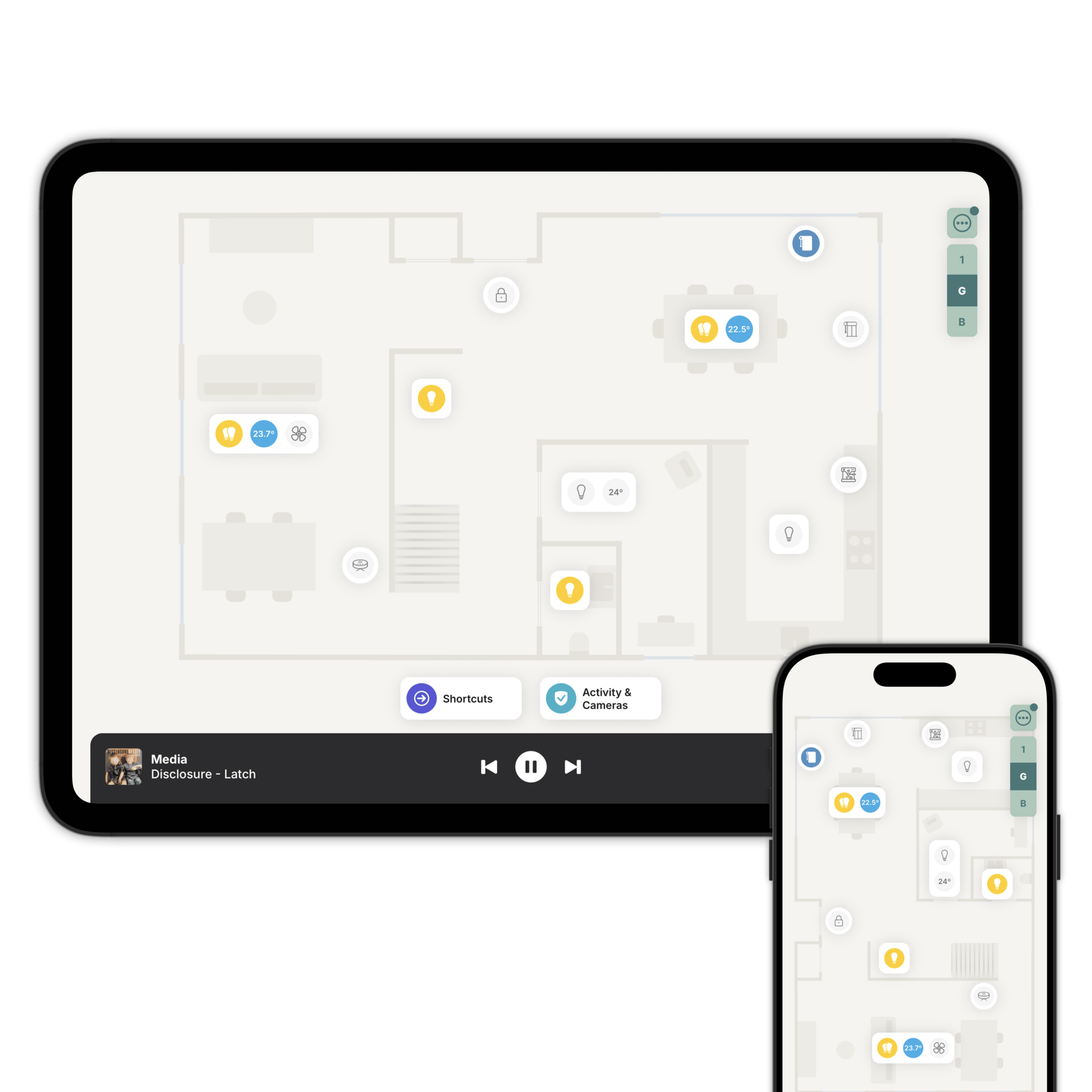
Tablets and wall panels can now show widgets next to the floorplan and the Tiles view, so you can see the time and what’s on your calendar at a glance. We’re starting with a clock and a calendar, and more widgets will come in the near future.
You can set up the widgets for each tablet and wall panel remotely. Go to Settings → Control Panels, select the device and tap Configure Widgets.
The calendar shows today’s events. Tap it to open the full calendar, with Day, Week and List views. You can add any calendar that has an ICS link, or choose from our public holiday calendars.
Please also update the Zendo app on your Homey, or the Zendo integration on Home Assistant (HACS), to the latest version. This makes the connection between Zendo and your Homey or Home Assistant more secure.
Home AssistantHomey26 October 2026 · v26.10.26
We’ve made big improvements to shortcuts, and the AI Assistant now speaks your language. It’s even faster, and uses a fraction of the AI credits.
When it needs to know more, the assistant asks you a few quick questions, with options you can tap. Then it shows you the shortcut it suggests, floor by floor, so you can see exactly what it will do. When you’re changing a shortcut you already have, it highlights what’s new, what’s changed and what’s being removed, so you can check every change before you use it. It can also help you choose a name and an icon for your shortcut.
You can now remove individual actions straight from your shortcut, without asking the assistant to do it, and Undo and Redo are there if you change your mind. While the assistant is helping you create a shortcut, tap Try It Now to test it before you save.
Shortcuts can now toggle accessories, so one shortcut turns the kitchen lights on when they’re off, and off when they’re on. Toggle works for blinds and music too.
On Homey, we’ve fixed Daikin Onecta air conditioning, Ajax security systems, the SwitchBot Blind Tilt and the Xiaomi P8 fan.
Home AssistantHomey19 October 2026 · v26.10.19
You can now add your security system to Zendo, and switch your alarm on as you leave and off as you arrive. Tap “Activity & Cameras”, then choose a mode such as Fully Armed, or Off. If the alarm has a code, Zendo asks for it when it’s needed and never stores it.
If the alarm is triggered, the “Activity & Cameras” button turns red. Tap it, then tap the alarm to switch it off. Your automations can also send a push notification that links directly to the alarm screen in Zendo, ready to switch off.
You can hide the alarm from children and guests with Family Sharing (Access Control). Shortcuts can switch it on and off too, for modes that don’t need a code.
Also in this release:
- Protect Settings on wall panels and tablets with an admin code, so only the people who know it can change how a device is set up.
- For installers, Control Panels now shows which wall panels and tablets are online, when each was last seen, and its IP address and Wi-Fi network.
Home AssistantHomey12 October 2026 · v26.10.12
We’ve made it easier to set up and manage the tablets on your walls and counters. The new Control Panels section in Settings keeps them in device groups, such as Hallway or Reception. These tablets are used by everyone in the property, so they now belong to a group rather than to one person.
Each device group shows only the accessories you choose, and you set this in Family Sharing (Access Control), just as you do for the people you’ve invited. The hallway tablet can show the front door, the porch lights and the doorbell, while the kitchen tablet shows the kitchen. Devices in a group can’t open admin settings or change your accessories, so nobody changes your setup by accident.
To add a tablet, go to Settings → Control Panels → Add Device on your phone, scan the QR code shown on the tablet, and choose its group. If your network stops the two devices from reaching each other, you can send the tablet a setup link instead. Add Device replaces Nearby Device Pairing in People & Invitations. To add someone’s own phone, invite them as before.
Your doorbell automations can now ring a whole group at once, so the panels near the front door ring and the bedrooms stay quiet. When you replace a tablet, add the new one to the same group and those automations keep working. You can also wake, lock or change the brightness of every device in a group at once. This needs the latest version of the Homey or Home Assistant (HACS) integration.
We’ve also reorganised Settings. The new Device Settings screen brings together the settings for the phone or tablet you’re using: Always-On Display, Floorplan Orientation, Language & Region and System Info. “Mounted Device (Kiosk)” is now called “Always-On Display (Kiosk)”, and the Kiosk Mode switch is now called Always-On Display.
Home AssistantHomey30 September 2026 · v26.9.30
We’ve spent this release on performance. Whichever phone or tablet you use, Zendo is now faster, uses less battery, or both. There is nothing new to learn and nothing to set up.
The biggest difference is on low-powered Android devices, where Zendo is now up to three times faster. If you have an entry-level Android tablet on the wall with Always-On Display on, you’ll notice it straight away.
On the latest iPhones and Android phones, which were already quick, Zendo now uses less battery in everyday use.
Home AssistantHomey24 September 2026 · v26.9.24
This is one of our biggest updates yet. Every floor can now be shown in two ways: as your floorplan, or in the new Tiles view, a grid of your accessories grouped by room. The floorplan is still the best way to see where things are. Tiles are the quickest way to reach them by name.
This also means you can keep your floorplan tidy without losing control of anything. Leave an accessory off the floorplan, or a whole room like the boiler room or the loft, and you can still control it all from Tiles. You can also add an accessory straight to a room in the Tiles view, and place it on the floorplan later.
Each tile says in plain words what the accessory is doing: how bright a light is, what temperature a thermostat is set to, whether a blind is open or closing. Tap a tile to open its controls, or press and hold it for a quick action, such as turning a light on or off. Your favourite accessories sit at the top of every floor.
For installers, Review Accessories in Settings → Rooms & Floors lists every accessory on each floor, room by room, including anything hidden from the floorplan. It’s designed for the final check before you hand a home over.
Also in this release:
- Rooms can now have an icon, such as Kitchen, Bedroom or Garden. Zendo suggests one from the room’s name.
- Drag tiles into the order you want, and the new order appears on everyone’s devices.
- “Edit Floorplan” is now called “Add or Change Accessories”, because it covers both views.
Home AssistantHomey18 September 2026 · v26.9.18
Security alerts let you mark the doors, locks, gates and sensors that matter, so Zendo highlights them the moment one needs your attention. A bathroom window open on a warm afternoon is fine. The front door left unlocked overnight isn’t.
Set an accessory to Warning or Critical, and Zendo highlights it in orange or red while it is open, unlocked, or detecting presence: on your floorplan, on the "Activity & Cameras" button at the bottom of the screen, and in the Activity & Cameras view. One look tells you that something needs attention, and where it is.
You’ll find the Security Alert section under Settings → Add or Change Accessories (or Edit Floorplan), on door and window sensors, smart locks, garage doors and gates, and presence sensors. Smoke, CO, gas and water leak sensors always raise a critical alert, so there is nothing to set up for those.
As soon as the door closes, the lock locks, or the sensor stops detecting presence, the highlight disappears on its own. There is nothing to clear, and when nothing is alerting the app looks the way it normally does.
Home AssistantHomey11 September 2026 · v26.9.11
Thermostats and aircon controllers now support swing and vane control. You can set which way your aircon sends the air from Zendo, instead of reaching for the remote.
Open a climate accessory and choose the swing mode your unit offers. Set the vanes moving so the air spreads across the room, or hold them still to keep the cold air off the sofa.
Zendo now picks your language for you. It reads the language your phone or tablet is set to and switches to the matching supported language. You can still choose a different one at any time in Settings → Device Settings → Language & Region.
We’ve also reorganised the Settings menu, so Property, People & Invitations and Offline Accessories are easier to use. When a camera stream can’t be played, Zendo now explains why, with the steps to fix it.
Home AssistantHomey7 September 2026 · v26.9.7
Already have a floorplan of your home? Upload it when you add a new floor, and Draw with AI will do the drawing for you.
Zendo reads your image and draws the walls, doors and windows. A floorplan from an estate agent works, and so does a drawing you already have. You then finish the design in the floorplan designer: add your furniture, map your outdoor areas, and adjust anything that isn’t quite right.
Robot vacuums on Home Assistant now always show their battery level, so you can see at a glance whether yours has enough charge for a clean. We’ve also improved Homey support for SwitchBot robot vacuums.
Home AssistantHomey31 August 2026 · v26.8.31
Deleting a floorplan is no longer final. If you change your mind, you can restore it for up to 48 hours.
Are you about to redesign your floorplan? You can now download a backup of the existing design before you start. Tap "Redesign", then "Export", to save the design, and "Import" to bring it back. The backup holds the rooms, walls and furniture, not the accessories you have placed on them.
We’ve also made changes for installers and partners. You can now create a new Zendo project directly from the Partners app, so setting up a new property takes just a few minutes.
Home AssistantHomey24 August 2026 · v26.8.24
Hoi 🇳🇱 Bonjour 🇫🇷 Hallo 🇩🇪 Hola 🇪🇸 Ciao 🇮🇹
You can now use Zendo in Dutch, French, German, Spanish or Italian. Go to Settings → Device Settings → Language & Region and choose yours.
Zendo doesn’t choose a language for you yet. It stays in English until you pick one yourself.
The choice applies to one device at a time, so you can use Zendo in Dutch on your phone while the wall-mounted tablet in the hall stays in English.
Rooms now list what is in them. Open a room and you’ll find Accessories in This Room, showing everything linked to it. It is the quickest way to see how a room is put together, and to go straight to something you want to change.
Deleting a room now takes its accessories with it. Zendo asks you to confirm twice first.
Also in this release:
- Roller shutters are now a window covering of their own, with the same up and down control as roller blinds.
- Window coverings use the compact view when the position slider is shown, so the controls stay easy to read.
- Ring Security now works on Homey, using the community app.
Home AssistantHomey14 August 2026 · v26.8.14
Zendo Original Moods are a new collection of ready-made colour moods for your home.
Tap "Moods" on any light to open the new mood gallery. Instead of spending time choosing colours and adjusting the brightness of each light, you can now create a complete look with a single tap.
Every mood is a Zendo Original, created by professional lighting designers in collaboration with Zendo. They carefully choose the colours, how they work together across the room, and the brightness, so every mood feels balanced and considered.
Nothing is fixed. Tap a mood to see it in your room straight away. If you want to make a change, you can adjust it using the colour wheel.
Security cameras on phones are now displayed in a compact grid when you have four or more cameras, making it faster to find the camera you need.
Home AssistantHomey7 August 2026 · v26.8.7
Location-based automations now work across multiple properties. If you have more than one home or office in Zendo, your location-based automations run for all of them automatically, in the background.
Whether you're leaving one property or arriving at another, Zendo uses your location to trigger the right automations at the right place. There's nothing extra to manage, and your location stays private.
Home AssistantHomey30 July 2026 · v26.7.30
There's a completely new way to control grouped lights. Zendo now gives you a single colour wheel for the whole room, making it easier than ever to adjust multiple lights together.
With the new colour wheel, you can see every light at a glance, with each one shown in its current colour. Drag a light to change its colour, or simply drag lights together to group them, then control the group with a single touch. You can switch between colour and warm-to-cool white lighting, and adjust the brightness of a single light, a group, or the whole room with one slider. Zendo also preserves the brightness balance between lights, creating smooth, natural dimming.
Finally, every light is shown along the bottom of the screen with its current colour and a dedicated on/off switch, making it quick to select the light you want.
Home AssistantHomey23 July 2026 · v26.7.23
You can now create light groups directly in Zendo. Simply choose multiple lights when adding an accessory to your floorplan, and control them as one with a single on/off switch and brightness control. For example, if you have three pendant lights over your dining table, you can display them as a single accessory on your floorplan. And if you ever want to adjust one light on its own, you still can.
We've also introduced Smooth Dimming. If the lights in a group are set to different brightness levels, Zendo dims or brightens them together while preserving their relative brightness. The result feels much more natural, without every light jumping to the same brightness.
We've also simplified the experience for guests. Energy, Climate Monitoring, and advanced accessory views such as Batteries and Offline Accessories are now hidden, keeping the app focused on the controls guests use every day.
Home AssistantHomey16 July 2026 · v26.7.16
Always-On Display has been completely reworked, giving you far more control over the tablets and displays you've dedicated to Zendo. Once Always-On Display is on, your mounted device shows up in Home Assistant and Homey, so your automations can both control it and react to its state.
Wake the screen when someone rings the doorbell or walks up to a nearby motion sensor. Lock the tablet with a PIN when everyone leaves home or you arm the alarm, then unlock it automatically when you're back. Switch to a dimmer, quieter night mode in the evening and back to full brightness in the morning. You can also react to the tablet itself, for example getting an alert if it drops off the network, or putting its charger on a smart plug to keep the battery in a healthier range.
You can also turn a wall-mounted tablet into a full-screen door panel and intercom that rings, shows who's there, and lets you answer on the spot.
Home AssistantHomey10 July 2026 · v26.7.10
You now have a complete view of your home's energy use in one place. Monitor your electricity, water, and gas consumption, as well as solar production, home battery charging, and EV charging, helping you better understand how your home uses energy every day.
Thermostats and climate sensors now include a full history of temperature and humidity readings, making it easier to spot trends and keep your home comfortable over time.
Home AssistantHomey7 July 2026 · v26.7.7
Smart plugs and on/off relays now provide more detailed energy monitoring. You can view the current power draw, along with a history of power usage and total energy consumption, for supported devices on both Home Assistant and Homey.
EV chargers are now supported on Homey. You can start or stop charging, check the current charging status, and adjust settings such as charge limits and charging modes. Supported brands include Easee, Zaptec, go-e, Peblar, Amina, Voltie, Enua, Wallbox, NexBlue, and myenergi. On Home Assistant, EV chargers can also be added to your floorplan as on/off accessories.
Home AssistantHomey2 July 2026 · v26.7.2
Zendo gives you an even better view of your home's safety. Add smoke detectors, carbon monoxide alarms, water leak sensors, and gas leak detectors to your floorplan and instantly see when something needs your attention.
When a safety sensor is triggered, the Activity & Cameras tile turns red so it's easy to spot. You can also pair this with critical push notifications from your Home Assistant or Homey to be notified straight away, wherever you are.
You can now sort rooms in Climate Monitoring. Added support for ONVIF cameras on Homey.
Home AssistantHomey29 June 2026 · v26.6.29
This is one of our biggest updates yet, with a complete redesign of the floorplan to make your home easier to understand at a glance.
Motion, presence, occupancy, and door or window sensors are now part of the floorplan. You can instantly see which rooms are occupied and whether doors or windows are open or closed, directly from your floorplan.
Climate monitoring has also been improved. You can now add humidity and air quality sensors to any room, even without a thermostat or temperature sensor. Zendo automatically combines the information from your floorplan to give you a clearer view of your home's comfort.
We've also redesigned the main menu with new Floorplan Modes, so you can focus on what matters most. Control mode gives you quick access to lights, thermostats, fans, blinds, and other everyday accessories. Security mode brings together smart locks, garage doors, gates, presence sensors, and door or window sensors in one dedicated view.
Finally, Recent Activity has been completely reworked. Activity is now grouped by room and floor, making it much easier to see where something has happened. Tap any room to view the live status of all its accessories and a timeline of recent events, giving you a clear picture of what's happening throughout your home.
Home AssistantHomey22 June 2026 · v26.6.22
Inviting people to your Zendo on Homey is easier than ever. You can now automatically sign in invited users on their behalf, making it perfect for guests, family members, or visitors who don't have a Homey account. Just send the invitation and they'll be ready to get started.
Robot hoovers and vacuum cleaners now support vacuum intensity and vacuum + mop modes on supported devices.
Gates and garage doors are now shown as related accessories when viewing cameras and doorbells, making it easier to control access from one place.
Improved the reliability of camera streaming on iOS for a smoother viewing experience.
Home AssistantHomey17 June 2026 · v26.6.17
Thermostats now support presets, making it easy to switch between modes such as Home, Away, and Boost.
Blinds now support tilt control, perfect for Venetian blinds and pergola roofs.
Instant power consumption is now displayed for on/off accessories, fans, and humidifiers or dehumidifiers. This is the first step in a series of new energy monitoring features.
Fans now support additional modes, such as Quiet and Boost, and can display filter status when available.
Home AssistantHomey9 June 2026 · v26.6.9
Rooms can now have multiple thermostats. You can join the public testing of this new feature directly from the app. Just tap the menu button, then go to Settings > Add or Change Accessories (or Edit Floorplan), select your thermostat, and choose Request Early Access.
Improved support for Homey, including KNX thermostats, SwitchBot Hub for controlling air conditioning units, Daikin Onecta, and Smarter ThinQ for LG devices.
Home AssistantHomey5 June 2026 · v26.6.5
Floorplan updates are now delivered in real time to all running Zendo apps (requires the latest version of the Homey or HACS integration). This is especially useful for wall-mounted tablets and shared displays, keeping everyone up to date as changes are made. If the app isn't running, you can still manually refresh to download the latest settings.
We've also added more control over the Activity & Cameras tab. You can now choose who can view sensors, making it easy to hide security information from guests or disable the feature entirely.
Finally, you can now choose a default orientation for your floorplans. This is perfect for Macs, wall-mounted tablets, and dedicated control panels. Prefer to let the device decide? Simply leave it on Auto and the floorplan will rotate with the screen orientation.
Home AssistantHomey2 June 2026 · v26.6.2
Outdoor spaces are here. You can now map gardens, patios, balconies, terraces, driveways, pools, and other outdoor areas directly in the Floorplan Designer.
Add outdoor furniture such as sofas, dining sets, and BBQs, and even draw detached structures like sheds and pool houses just as easily as any indoor room.
Once your outdoor space is mapped, you can bring it to life with accessories. Control your garden lights, open the electric gate from the sofa, check outdoor cameras, and manage your outdoor spaces with the same simple experience you enjoy indoors.
How to set up outdoor areas
Home AssistantHomey28 May 2026 · v26.5.28
You can now add temperature sensors to rooms that don't have a thermostat, so you can monitor the temperature directly from your floorplan.
Add Device is here. You can add a new device to your Zendo by scanning a QR code and pairing over your local network - no link to share and no email to send. It's ideal for wall-mounted tablets and setting up multiple devices in batch.
Homey26 May 2026 · v26.5.26
Support for accessories on Homey has been improved, including support for the latest Tado app (v1.5.0) and Nest Doorbell cameras.
You can now also add your doorbell, even if it doesn't provide a snapshot image. A new Flow card lets you send push notifications and automatically open the doorbell live video when the notification is tapped, helping you see who's at the door more quickly.
How to set up doorbells & rich notifications
Home AssistantHomey20 May 2026 · v26.5.20
Smart doorbells are here. You can now see who's at the door, talk to visitors, and unlock the door if you have a smart lock, all from one screen.
When someone rings the doorbell, Zendo can send a notification with a snapshot image. Tapping the notification opens the live video stream, making it faster and easier to respond from anywhere.
How to set up doorbells & rich notifications
Home AssistantHomey7 May 2026 · v26.5.7
Humidifiers and dehumidifiers are now supported on both Home Assistant and Homey. You can turn devices on or off, adjust modes and target humidity, and monitor humidity levels directly from Zendo. On Homey, you'll also receive a message when the water tank becomes full or empty.
Offline accessories and battery monitoring have been redesigned to provide clearer and more useful information. It's now easier to understand what needs attention, quickly identify devices with low batteries or connection issues, and keep your smart home running reliably.
Home AssistantHomey4 May 2026 · v26.5.4
Air purifiers are now supported on both Home Assistant and Homey. You can control the fan speed, set the mode, and check air quality readings when supported by your device. You'll also receive a reminder when it's time to change the filters.
If you have many lights on your floorplan, you can now hide some when using your phone to keep things clear and simple. You can still control all hidden lights as a group or individually. You can also choose to always show selected lights, such as your bedside lights, so they are always easy to access.
Home AssistantHomey1 May 2026 · v26.5.1
Controlling grouped lights is now much simpler. You can easily control each individual light within a group or room, giving you more flexibility when you need it.
Homey now supports robot hoovers and vacuum cleaners from brands such as Roborock, Dreame, Dyson, Eufy, iRobot, Xiaomi, and SwitchBot.
We've also improved control in Homey for:
- Multi-channel relays and sockets (SwitchBot, Aqara/Xiaomi, Sonoff)
- Dyson fans
- SwitchBot and Aqara TRV valves
- Xiaomi blinds and curtain controllers
Home AssistantHomey28 April 2026 · v26.4.27
Improved support for Shelly, Sonoff, and Lutron devices on Homey, including fans, thermostats, TRV valves, blinds and curtains.
Automations and Flows that cannot be triggered are now clearly marked, so it's easier to understand what is available.
We've also refined how speaker favourites are handled and improved the way you can send support requests, making the overall experience smoother.
Home AssistantHomey22 April 2026 · v26.4.22
Rooms & Floors is now simpler and easier to use. All floors and rooms are now shown on one screen, so it's quicker to navigate and understand your space.
Adding new rooms is now straightforward, and accessories are automatically added when you create a new room. This helps you build and manage your floorplans with less effort and more clarity.
Home AssistantHomey20 April 2026 · v26.4.21
Completely reworked thermostats to support more systems and give you more control:
- Support for dual setpoint thermostats (heating and cooling, common in North America)
- Fan mode selection for air conditioning units and HVAC
- Additional modes such as Dry and Fan
- Support for thermostats without current temperature (for example IR-controlled units)
- Improved support for Homey thermostats, including Tado
Also new:
- You can now link humidity sensors from a humidifier or dehumidifier with a thermostat in Homey
Home AssistantHomey15 April 2026 · v26.4.16
Introducing Zendo Floorplan Designer. You can now design your floorplan exactly the way you like, with more control and flexibility to match your space.
As your home or workspace changes, Zendo can change with you. Move furniture, update layouts, and refine your floorplan at any time; everything stays easy to adjust and always up to date.
This is a big step towards making your space feel truly yours, with a setup that is both personal and simple to manage.
Home AssistantHomey9 April 2026 · v26.4.10
Completely reworked Moods for your lights. Zendo-designed moods are now automatically added when you set up a new light, so you can get started right away. You can also choose which mood or scene is applied when turning on a light; and include moods in your Shortcuts: perfect for a "Good Night" routine.
We've also made it easier to select the right accessory with a smarter "Suggested" section, helping you find what you need quickly.
Tapping a push notification with an image will now open the full notification inside the app, including the image, so you can see all the details at a glance.
Home AssistantHomey1 April 2026 · v26.4.1
Climate Monitoring lets you check the temperature, humidity, and air quality across your home, all in one place.
We've also improved how hidden accessories are handled. Devices hidden in Home Assistant are no longer included in battery status or disconnected accessory lists.
Home Assistant26 March 2026 · v26.3.27
The official Home Assistant HACS integration for Zendo is here. It is now easier than ever to add push notifications to your automations.
You can also turn your humidifier or dehumidifier on and off directly from Zendo.
We've also updated the app to support colour temperature lights on Home Assistant 2026.3.
Home Assistant19 March 2026 · v26.3.20
You now have a clearer view of what's happening in your property, helping you feel safe and in control. If you hear a noise at night, you can quickly check what's going on. During the day, you can see where there has been activity at a glance.
You can now view the real-time status of your motion and contact sensors, smart locks, garage doors, and electric gates, all in one place. Each sensor also includes a detailed history, so you can go back and see what happened and when.
Home Assistant6 March 2026 · v26.3.6
Zendo now supports WebRTC for security cameras. This provides faster and more reliable video streaming with lower delay, helping your camera feeds feel more immediate and responsive.
We've also improved the control sliders for brightness, blinds and curtains, and fans. You can now tap anywhere on the slider to quickly set a value, or slide for more precise control.
Home Assistant24 February 2026 · v26.2.23
Zendo can now automatically add your lights, thermostats, fans, media players, and cameras when you create a new floorplan. This makes setup faster and helps you get started right away.
We've also updated security cameras to work with the latest versions of Home Assistant, ensuring better compatibility and smoother performance.
In addition, we've improved the experience when moving rooms on your floorplan, making adjustments feel more precise.
Home Assistant16 February 2026 · v26.2.16
Controlling lights by room is now easier. You can now control all lights in a room without creating groups in Home Assistant: Zendo automatically creates the group for you and keeps it up to date when lights are added or removed.
Grouped lights are automatically detected: you have a new option to control individual lights in a group. You can control the whole room at once, or adjust individual lights when you need to.
Home Assistant3 February 2026 · v26.2.4
You can now rotate floorplans, making it easier to align rooms correctly when switching between floors. This helps ensure spaces above each other are positioned just the way you expect.
Home Assistant23 January 2026 · v26.1.23
Zendo can now connect directly to your Home Assistant on your local network with local control. This lets you control your smart accessories even when your internet is offline, and keeps your commands inside your home or office for faster and more reliable control.
We've also added a small improvement in System Info: you can now press and hold any row to copy its value to the clipboard, making it easier to share details during setup or support.
Home Assistant20 January 2026 · v26.1.19
Managing floorplans is now easier than ever. You can add new rooms to your floorplan, move existing rooms by holding and dragging them while in edit mode, or remove rooms you no longer need.
Media players and speakers now support Music Assistant playback. You can play your favourites on all Music Assistant speakers, including Chromecast and Alexa devices.
We've also improved the configuration experience. The list of accessories now shows their platform names, making it easier to recognise and manage your devices.
Home Assistant15 January 2026 · v26.1.14
Shortcuts have been improved. You can now play one of your favourites as part of a shortcut, which is perfect for a "Good Morning" routine.
Door lock settings have also been updated. You can now choose whether the latch or spring is pulled when unlocking the door, giving you more control.
Finally, if your app is managed by an installer, their contact details are now shown in the settings, making it easier to get support when you need it.
Home Assistant5 January 2026 · v26.1.5
You can now delete a floorplan. Not happy with your current one? Just scan your property again and decide which version you prefer.
You can also give your device a custom name, which helps identify it in People & Invitations. To set it, go to Settings → Device Settings → System Info → Device Name.
Home Assistant2 January 2026 · v26.1.2
Always-On Display is designed for devices that stay in one place, such as a wall-mounted tablet or a device on a desk or counter. The screen stays on so your floorplan is always visible, and it automatically dims when not in use to reduce energy consumption.
We've also simplified the settings menu to make it easier to find what you need.
Home Assistant11 December 2025 · v1.48.1
Small improvements to make Zendo feel more streamlined, whether you're using it at home or at work.
Home Assistant5 December 2025 · v1.48.0
Small improvements to make Zendo feel more streamlined, whether you're using it at home or at work.
Home Assistant1 December 2025 · v1.47.0
Zendo now connects to your Home Assistant over your local network, so you can control your accessories even when your internet is offline. Local Connection is available for commercial installations, such as offices, hotels, and wellness spaces.
Home Assistant21 November 2025 · v1.46.0
The AI Assistant is now available to everyone. Describe what you want in your own words and it builds the shortcut for you, or suggests new ideas. It's a fast, natural way to control your home.
Home Assistant14 November 2025 · v1.45.0
Adding accessories to your floorplan is faster and clearer. The add accessory menu has been redesigned to help you find what you need in just a few taps.
You can also check the status of your Zendo membership directly from the settings menu.
Home Assistant11 November 2025 · v1.44.0
Create your shortcuts directly in Zendo with the new AI Assistant. Describe what you want and it builds the shortcut for you, or suggests ideas. The AI Assistant is in early access and will roll out to everyone over the coming months.
Home Assistant26 October 2025 · v1.43.0
Push notifications can now include images, such as a snapshot from your security camera, so you can see what's happening straight away. Tapping a notification can also open a specific accessory, making it quicker to take action.
Home Assistant3 October 2025 · v1.42.0
The floorplan has been rebuilt. It looks the same, but it's faster and smoother. Switching between floors is instant, and you can see the status of your home right away.
Home Assistant30 September 2025 · v1.41.0
A redesigned sign-up flow makes getting started simpler.
Home Assistant22 September 2025 · v1.40.0
You can now manage your floorplans from Rooms & Floors, including adding new floors, renaming existing ones, and changing their order.
Home Assistant15 September 2025 · v1.39.0
Add your favourite radio stations and Spotify playlists to Zendo, then play them with a single tap.
Home Assistant29 August 2025 · v1.37.0
Stream your security cameras directly on the floorplan, and turn on the lights to improve the picture in low light without leaving the video stream.
You can also add robot hoovers and vacuum cleaners. Start and stop cleaning, send the robot back to its dock, and play a sound to find it.
Home Assistant20 August 2025 · v1.36.0
Lights now support effects, such as Philips Hue Candle, Fire, and Opal.
Fans now support oscillation, reverse airflow, and presets.
Location-based automations include a new troubleshooting option to help you understand why an automation didn't run. All data stays on your device.
Renaming rooms is simpler, and the app reconnects faster after a connection drop.
Home Assistant13 August 2025 · v1.35.0
You can now preview changes to an accessory without leaving edit mode.
When adding accessories, Zendo suggests ones that suit the room you're setting up.
The blind and curtain icon now shows how far it's open, and offline accessories show a message on the floorplan.
For faulty accessories or low batteries, the accessory ID is now shown to make troubleshooting easier. We've also improved colours, vibration feedback, and how the controls respond.
Home Assistant31 July 2025 · v1.34.0
Location-based automations now support custom locations, so you can run actions when people are away from home, such as arriving at the office or school.
This release also adds support for garage doors and electric gates.
Blinds and curtains now support simple open and close, lights include a colour picker (full colour, or shades of white for white ambience bulbs), and thermostats show humidity when supported.
Home Assistant27 July 2025 · v1.33.0
Shortcuts let you set up to eight automations or scenes and launch them straight from your floorplan.
Smart locks are now supported. Lock and unlock your door, pull the latch or spring, and check whether the door is open or closed.
You can now move accessories around the floorplan by holding and dragging them in edit mode, and search for an accessory in the batteries list.
Home Assistant17 July 2025 · v1.32.2
Further improvements to Push Notifications, including Critical Alerts and Time Sensitive Notifications.
Home Assistant28 June 2025 · v1.32.0
You can now send push notifications to Zendo from your Home Assistant automations.
You can also swipe up the player bar to open your media players.
Home Assistant18 June 2025 · v1.31.3
You can now change the order of your media players.
Adding multiple floorplans is also easier.
Home Assistant15 June 2025 · v1.31.2
Improvements behind the scenes to make the app run more smoothly.
Home Assistant11 June 2025 · v1.31.1
Improvements behind the scenes to make the app run more smoothly.
Home Assistant21 May 2025 · v1.30.0
Location-based automations get your home ready for your arrival and help you save on bills when you're away.
Home Assistant automation insights put your automations at your fingertips, so you can quickly stop one when you have guests over.
Dates, times, and temperatures now follow your local format, including Fahrenheit. Moods let you set a scene or automation to suit the room and your lifestyle.
Home Assistant14 May 2025 · v1.29.0
Share your Zendo home with family, friends, and guests. You can set access control rules for each accessory, so just tap one to show or hide it for the people in your home.
Home Assistant24 April 2025 · v1.28.0
Moods let you set up to eight actions for your lights, so you can apply a scene or trigger an automation in a single tap.
Home Assistant16 April 2025 · v1.27.0
You can now set the location of your home, ready for location-based automations coming soon.
You can also add or change floors directly from the app.
We've also improved the lighting and fan control layouts and made small changes to the settings menu.
Home Assistant5 April 2025 · v1.26.1
Support for multi-floor homes.
You can now use a simple on/off switch as a light controller on Home Assistant. We've also improved performance when editing your floorplan and made the connection to your Home Assistant more resilient.
Home Assistant25 March 2025 · v1.25.2
Improvements to the new account activation flow.
Home Assistant14 March 2025 · v1.25.0
Home Assistant12 March 2025 · v1.24.0
Home Assistant6 March 2025 · v1.23.3
Behind-the-scenes improvements for better speed and reliability.
Home Assistant26 February 2025 · v1.23.2
Behind-the-scenes improvements for better speed and reliability.
Home Assistant15 February 2025 · v1.22.0
Introduced a new and improved demo mode.
Home Assistant30 January 2025 · v1.21.4
You can now link accessories to a room on your floorplan, helping you find them faster when you need to control them.
Home Assistant6 January 2025 · v1.21.3
Introduced a new colour scheme for your floorplan.
Home Assistant4 December 2024 · v1.21.2
Improved reliability when restoring your phone or tablet from a backup for both Android and iOS.
Home Assistant28 November 2024 · v1.21.1
Behind-the-scenes improvements for better speed and reliability.
Home Assistant28 October 2024 · v1.20.3
Behind-the-scenes improvements for better speed and reliability.
Home Assistant9 October 2024 · v1.20.0
Behind-the-scenes improvements for better speed and reliability.
Home Assistant28 September 2024 · v1.19.0
Behind-the-scenes improvements for better speed and reliability.
Home Assistant12 September 2024 · v1.18.0
Improved support for Home Assistant accessories.
Home Assistant4 August 2024 · v1.16.0
Behind-the-scenes improvements for better speed and reliability.
Home Assistant18 June 2024 · v1.15.0
The first public version of the app.
Home Assistant15 March 2024 · v1.10.0
The first private beta of the app, shared with our early adopters.